It's really simple.
http://hldj.org/downloads.htmlI prefer 32 bits install.After Downloading.Unzip it into a folder which can be located on your desktop or any easy reachable place.After that open it.After first run you will get the "window" Set up games now or smth.Click Yes.It will redirect you to a new window where you can add games.You should Click new on the "Window" auto adding games, (you can use it but you should do it manually for evading bugs.)Click "+" button to add a gameNow.In the Perimeter "Game name" you should nick your game for example Cs(most recognizable)In the Engine Perimeter Select "GoldScr" the other one is for source games for example css,l4d,l4d2,mods and etc.In the Perimeter "Audio Key" you have a selection of which hotkey should be binded while playing the sound.In the Perimeter "Game Directory" you must find the cstrike folder (Doesn't matter if it's steam or not)If it's steam you go.-Steam()My Computer/(Disk where it's installed)/Program Files/Steam/Username/Steamapps/Cs 1.6/cstrike(save it there)-Nonsteam()My Computer/(Disk where it's installed)/Program Files/Valve/Counter-Strike/Cstrike(save it there)Note:Only save it in the folder, not the executable file.In the Perimeter "Audio Directory" you have to make a new folder and put it as folder where your converted sounds will be saved (First you must convert them)After that you hit (The Green Button all the way until you reach the general window)After this.You download a converter.I prefer audacity (For mixing, making songs, Converting)
http://audacity.sourceforge.net/After downloadingInstall it.It's not rly that hard.Language customize is available.After being run for the first time you add songs to it.When you add a song you wait for the import.After that you remove the double tracks.For instance.Many songs nowday's have double tracks for protection of cracking it and downloading Illegal Music, which fails.You will have to hit a button which is located at the song pointing downwards of it.
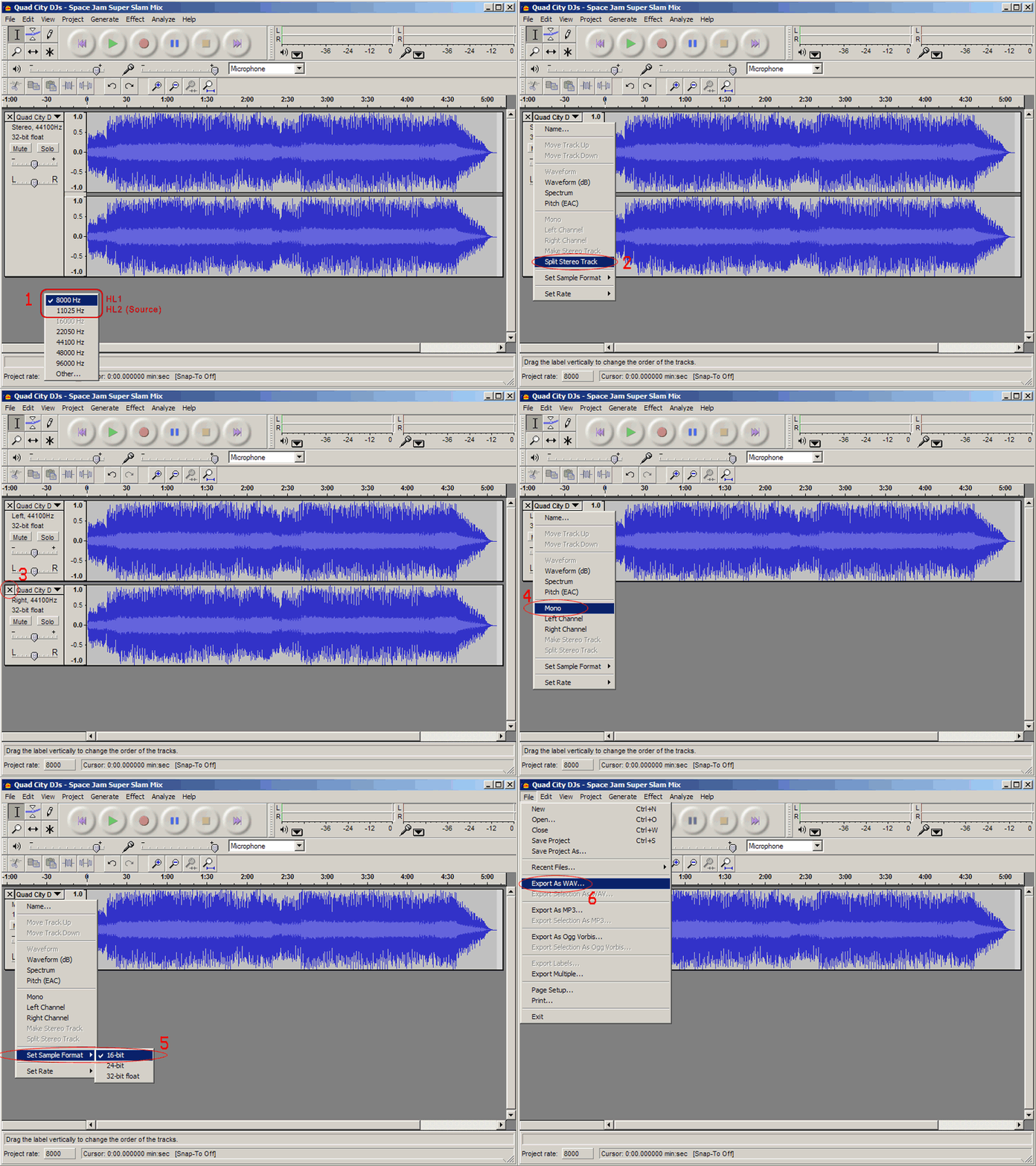
After preforming these tasks you save it as "WAV file" so hldj can recognize it.When the song is ready you save it to the audio directory which you previously created.When that is doneYou hit the "Play" button on the general window and (Do not Close HLDJ by any means necessary, if you want to play songs :O)You start cs.I think steam can detect this a cheat because it uses injection methods but not all the time.While ingame you type in console"la"To display the list of songs.Every song has a numberYou only type the number in the game and you press your hotkey and there you have it.Any questions can be asked here and answered by me.
 Topic: [Tuto]How to work with HLDJ (I won\\\'t add the extension of mixing] (Read 283 times)